Build a Single-Page CRUD App with Fetch
Every tutorial so far has either kept its data in a plain JavaScript array (gone the moment you
reload the page) or read from a single endpoint once and stopped. This one does all four REST
operations — **C**reate, **R**ead, **U**pdate, **D**elete — against a real, live, public API, using
nothing but fetch, plain HTML, and vanilla JavaScript. By the end you'll have one page that lists
stories from a server, adds new ones through a validated form, edits any story in place, and
deletes it — with every change actually persisted on a real backend, not just in memory.
Prerequisites: Build a Dynamic To-Do List (building DOM elements from data),
Callbacks, Promises, and Async/Await, and
Lecture 15: Asynchronous JavaScript
— this tutorial is the hands-on companion to that lecture's REST APIs and Fetch API sections, and
assumes you're already comfortable with async/await, fetch, and event delegation.
In This Tutorial
- Talk to a real REST API — the Fake Stories API
— with one small
asyncfunction per HTTP method:GET,POST,PUT,DELETE - Write client-side form validation that actually matters, because this API accepts anything you send it, blank fields included — your validation is the only thing protecting the data
- Build an edit-in-place UI: click Edit, the story's text turns into input fields right where
it was; click Save, and a
PUTrequest updates the real record - Handle loading and error states for every network call, instead of assuming the request always succeeds
- Use event delegation (from the Event Inspector tutorial) so Edit/Delete work on cards that didn't exist when the page first loaded
Part 1: The API You're Building Against
Everything in this project talks to one real, public endpoint built for exactly this kind of
practice: usmanlive.com/fake-stories-restful-api.
No sign-up, no API key. Every story is { id, title, content }.
| Method | Endpoint | Body | Returns |
|---|---|---|---|
GET |
/stories |
— | An array of every story |
POST |
/stories |
{ title, content } |
{ message, story_id } |
PUT |
/stories/:id |
{ title, content } |
{ message } |
DELETE |
/stories/:id |
— | { message } |
This API does not validate anything server-side
Sending POST /stories with an empty {} body is accepted without complaint, and silently
creates a story with blank fields. That's not a bug you need to work around — it's the whole
reason this tutorial spends real effort on client-side validation in Part 3. If the server
won't stop bad data, your form has to.
Part 2: Set Up Your Project Folder
Same three-file shape as every other project in this series:
Part 3: Build the Complete HTML
<!DOCTYPE html>
<html lang="en">
<head>
<meta charset="UTF-8">
<meta name="viewport" content="width=device-width, initial-scale=1.0">
<title>Stories CRUD</title>
<link rel="stylesheet" href="style.css">
<script src="script.js" defer></script>
</head>
<body>
<div class="container">
<header>
<h1>Stories</h1>
<p class="subtitle">
A single-page CRUD app, talking to a real REST API with fetch — no frameworks.
</p>
</header>
<main>
<section class="panel">
<h2>Add a New Story</h2>
<form id="storyForm" novalidate>
<div class="field">
<label for="titleInput">Title</label>
<input type="text" id="titleInput" name="title" placeholder="A short, punchy title">
<p class="field-error" id="titleError"></p>
</div>
<div class="field">
<label for="contentInput">Content</label>
<textarea id="contentInput" name="content" rows="3" placeholder="What's the story?"></textarea>
<p class="field-error" id="contentError"></p>
</div>
<div class="form-actions">
<button type="submit" id="submitBtn">Add Story</button>
<span class="form-status" id="formStatus"></span>
</div>
</form>
</section>
<section class="panel">
<div class="panel-header">
<h2>All Stories</h2>
<button type="button" id="refreshBtn">Refresh</button>
</div>
<p class="list-status" id="listStatus">Loading stories…</p>
<ul class="story-list" id="storyList"></ul>
</section>
</main>
<footer>
<p>Built with HTML, CSS, and plain JavaScript — talking to a real API with fetch.</p>
</footer>
</div>
</body>
</html>
Two details worth noticing:
novalidateon the<form>turns off the browser's own built-in validation bubbles entirely. That's deliberate — Part 4 writes custom validation with its own error messages styled to match the page, and the browser's native popups would fight with it.- Every piece of dynamic content — the story list, the status messages — starts as an empty or
placeholder element (
<ul id="storyList"></ul>,Loading stories…). Nothing here is filled in untilscript.jsruns and fetches real data; that's the whole point of the next two parts.
Part 4: Write the Complete JavaScript
const API_BASE = "https://usmanlive.com/wp-json/api/stories";

const TITLE_MIN = 3;
const TITLE_MAX = 80;
const CONTENT_MIN = 10;
const CONTENT_MAX = 500;

// -----------------------------------------------------------------
// Validation — pure functions, no DOM. Each returns an error
// string, or "" when the value is valid. The API itself accepts
// anything (even {}), so these rules are the only real protection
// the data has.
// -----------------------------------------------------------------
function validateTitle(value) {
  const trimmed = value.trim();
  if (trimmed === "") return "Title is required.";
  if (trimmed.length < TITLE_MIN) return `Title must be at least ${TITLE_MIN} characters.`;
  if (trimmed.length > TITLE_MAX) return `Title must be ${TITLE_MAX} characters or fewer.`;
  return "";
}

function validateContent(value) {
  const trimmed = value.trim();
  if (trimmed === "") return "Content is required.";
  if (trimmed.length < CONTENT_MIN) return `Content must be at least ${CONTENT_MIN} characters.`;
  if (trimmed.length > CONTENT_MAX) return `Content must be ${CONTENT_MAX} characters or fewer.`;
  return "";
}

// -----------------------------------------------------------------
// API calls — one small async function per HTTP method, each
// checking response.ok before trusting the result.
// -----------------------------------------------------------------
async function apiGetStories() {
  const response = await fetch(API_BASE);
  if (!response.ok) throw new Error(`Failed to load stories (status ${response.status})`);
  return response.json();
}

async function apiCreateStory(title, content) {
  const response = await fetch(API_BASE, {
    method: "POST",
    headers: { "Content-Type": "application/json" },
    body: JSON.stringify({ title, content }),
  });
  if (!response.ok) throw new Error(`Failed to create story (status ${response.status})`);
  return response.json();
}

async function apiUpdateStory(id, title, content) {
  const response = await fetch(`${API_BASE}/${id}`, {
    method: "PUT",
    headers: { "Content-Type": "application/json" },
    body: JSON.stringify({ title, content }),
  });
  if (!response.ok) throw new Error(`Failed to update story ${id} (status ${response.status})`);
  return response.json();
}

async function apiDeleteStory(id) {
  const response = await fetch(`${API_BASE}/${id}`, { method: "DELETE" });
  if (!response.ok) throw new Error(`Failed to delete story ${id} (status ${response.status})`);
  return response.json();
}
Let's go through the new ideas one at a time before the rest of the file.
Why validation is plain functions, not DOM code
function validateTitle(value) {
  const trimmed = value.trim();
  if (trimmed === "") return "Title is required.";
  // ...
}
validateTitle and validateContent take a plain string and return a plain string — they never
touch document, never read an <input> directly. That separation is deliberate: the exact same
two functions get reused twice in this project — once for the "Add a New Story" form, and again
for every card's inline edit form — without being copy-pasted. Whenever you find yourself about to
duplicate a validation check, that's the signal to pull it out into a function like this one.
One function per HTTP method
async function apiCreateStory(title, content) {
  const response = await fetch(API_BASE, {
    method: "POST",
    headers: { "Content-Type": "application/json" },
    body: JSON.stringify({ title, content }),
  });
  if (!response.ok) throw new Error(`Failed to create story (status ${response.status})`);
  return response.json();
}
Every one of the four api* functions follows the identical shape from Lecture 15: call fetch,
check response.ok before trusting anything, throw a real Error if it wasn't, and return the
parsed JSON if it was. None of them touch the DOM either — they only know how to talk to the
server. Keeping "talk to the server" and "update the page" as separate functions is what makes the
rest of this file possible to read: every DOM-touching function below just calls one of these and
reacts to success or failure.
Rendering the list
function escapeHtml(text) {
  const div = document.createElement("div");
  div.textContent = text;
  return div.innerHTML;
}

function renderStories(stories) {
  const list = document.getElementById("storyList");
  list.innerHTML = "";

  if (stories.length === 0) {
    list.innerHTML = '<li class="empty-state">No stories yet — add the first one above.</li>';
    return;
  }

  stories.forEach((story) => {
    const li = document.createElement("li");
    li.className = "story-card";
    li.dataset.id = story.id;
    li.innerHTML = `
      <div class="story-view">
        <h3 class="story-title">${escapeHtml(story.title)}</h3>
        <p class="story-content">${escapeHtml(story.content)}</p>
        <div class="story-actions">
          <button type="button" class="edit-btn">Edit</button>
          <button type="button" class="delete-btn">Delete</button>
        </div>
      </div>
      <div class="story-edit" hidden>
        <div class="field">
          <label>Title</label>
          <input type="text" class="edit-title-input" value="${escapeHtml(story.title)}">
          <p class="field-error edit-title-error"></p>
        </div>
        <div class="field">
          <label>Content</label>
          <textarea class="edit-content-input" rows="3">${escapeHtml(story.content)}</textarea>
          <p class="field-error edit-content-error"></p>
        </div>
        <div class="story-actions">
          <button type="button" class="save-btn">Save</button>
          <button type="button" class="cancel-btn">Cancel</button>
        </div>
      </div>
    `;
    list.appendChild(li);
  });
}
escapeHtml is not optional
story.title and story.content came from the network — ultimately, from whatever anyone
typed into this exact form. Writing them straight into innerHTML without escaping would let
someone type <img src=x onerror=alert(1)> as a "title" and have it execute as real HTML the
instant any visitor loads the list — the XSS risk Lecture 13 and Lecture 14 both warned about.
escapeHtml sidesteps it cheaply: handing text to a real element's .textContent and reading
back .innerHTML lets the browser do the escaping for you, correctly, every time.
Each card is built with two sibling sections — .story-view (the normal read-only display) and
.story-edit (a hidden form, pre-filled with that story's current values) — and only one of the
two is ever visible at once, toggled by the hidden attribute. This is the same "build the DOM
from data" pattern as the To-Do List tutorial, just with two display states per item instead of
one.
Loading the list, with a real loading and error state
async function loadStories() {
  const status = document.getElementById("listStatus");
  const list = document.getElementById("storyList");

  // Only show "Loading…" when there's nothing on screen yet — the
  // very first load, or after a failed fetch. On a refresh after
  // add/edit/delete, the existing cards stay visible, untouched,
  // until the new data is ready to replace them in one swap.
  if (list.children.length === 0) {
    status.textContent = "Loading stories…";
    status.hidden = false;
  }

  try {
    const stories = await apiGetStories();
    status.hidden = true;
    renderStories(stories);
  } catch (error) {
    status.textContent = `Couldn't load stories: ${error.message}`;
    status.hidden = false;
  }
}
loadStories is the one function every other part of this page calls after it changes something —
after a create, an update, or a delete, instead of trying to patch the existing list in place, the
page just asks the server for the truth again. That's a deliberate simplification: re-fetching
means the list on screen can never silently drift out of sync with what's actually saved, at the
cost of one extra network request per change — a trade worth making for a page this size.
Don't clear the list before you have something to replace it with
An earlier version of this function cleared #storyList (list.innerHTML = "") and showed
"Loading…" on every call, including refreshes after an edit or delete. That's a real,
visible bug: the whole list would blank out and flash a loading message for every single
operation, even though almost nothing on screen had actually changed. The fix is the
list.children.length === 0 check above — the list only ever gets cleared once new data has
actually arrived to replace it (inside renderStories), never a moment before.
Handling the "Add a New Story" form
function setupCreateForm() {
  const form = document.getElementById("storyForm");
  const titleInput = document.getElementById("titleInput");
  const contentInput = document.getElementById("contentInput");
  const titleError = document.getElementById("titleError");
  const contentError = document.getElementById("contentError");
  const submitBtn = document.getElementById("submitBtn");
  const formStatus = document.getElementById("formStatus");

  form.addEventListener("submit", async (event) => {
    event.preventDefault();

    const titleMsg = validateTitle(titleInput.value);
    const contentMsg = validateContent(contentInput.value);
    titleError.textContent = titleMsg;
    contentError.textContent = contentMsg;
    titleInput.classList.toggle("invalid", Boolean(titleMsg));
    contentInput.classList.toggle("invalid", Boolean(contentMsg));

    if (titleMsg || contentMsg) {
      formStatus.textContent = "";
      return;
    }

    submitBtn.disabled = true;
    formStatus.textContent = "Saving…";
    formStatus.className = "form-status";

    try {
      await apiCreateStory(titleInput.value.trim(), contentInput.value.trim());
      form.reset();
      titleInput.classList.remove("invalid");
      contentInput.classList.remove("invalid");
      formStatus.textContent = "Story added.";
      formStatus.className = "form-status success";
      await loadStories();
    } catch (error) {
      formStatus.textContent = error.message;
      formStatus.className = "form-status error";
    } finally {
      submitBtn.disabled = false;
    }
  });
}
event.preventDefault() stops the form's default full-page-reload submission — familiar from
earlier tutorials — but everything after it is new: both fields are validated before any
network call happens, and if either one fails, the function returns immediately without ever
calling apiCreateStory. Only valid data ever reaches the network. While the request is in
flight, submitBtn.disabled = true stops a second click from firing a duplicate request — and the
finally block guarantees it gets re-enabled afterward, whether the request succeeded or failed.
Edit and Delete — one delegated listener for every card
function setupListDelegation() {
  const list = document.getElementById("storyList");

  list.addEventListener("click", async (event) => {
    const card = event.target.closest(".story-card");
    if (!card) return;
    const id = card.dataset.id;

    if (event.target.classList.contains("edit-btn")) {
      card.querySelector(".story-view").hidden = true;
      card.querySelector(".story-edit").hidden = false;
      return;
    }

    if (event.target.classList.contains("cancel-btn")) {
      card.querySelector(".story-view").hidden = false;
      card.querySelector(".story-edit").hidden = true;
      return;
    }

    if (event.target.classList.contains("save-btn")) {
      const titleInput = card.querySelector(".edit-title-input");
      const contentInput = card.querySelector(".edit-content-input");
      const titleError = card.querySelector(".edit-title-error");
      const contentError = card.querySelector(".edit-content-error");

      const titleMsg = validateTitle(titleInput.value);
      const contentMsg = validateContent(contentInput.value);
      titleError.textContent = titleMsg;
      contentError.textContent = contentMsg;
      titleInput.classList.toggle("invalid", Boolean(titleMsg));
      contentInput.classList.toggle("invalid", Boolean(contentMsg));
      if (titleMsg || contentMsg) return;

      const saveBtn = event.target;
      saveBtn.disabled = true;
      saveBtn.textContent = "Saving…";

      try {
        await apiUpdateStory(id, titleInput.value.trim(), contentInput.value.trim());
        await loadStories();
      } catch (error) {
        contentError.textContent = error.message;
        saveBtn.disabled = false;
        saveBtn.textContent = "Save";
      }
      return;
    }

    if (event.target.classList.contains("delete-btn")) {
      const title = card.querySelector(".story-title").textContent;
      const confirmed = window.confirm(`Delete "${title}"? This can't be undone.`);
      if (!confirmed) return;

      event.target.disabled = true;
      event.target.textContent = "Deleting…";

      try {
        await apiDeleteStory(id);
        await loadStories();
      } catch (error) {
        window.alert(error.message);
        event.target.disabled = false;
        event.target.textContent = "Delete";
      }
    }
  });
}
This whole function is one listener, attached to #storyList once, back when the list was
still empty. Every card renderStories builds afterward — including ones that didn't exist yet
when this listener was attached — still works correctly, for exactly the reason
the Event Inspector tutorial covered: a click on any button inside a
<li> bubbles up to the <ul>, where this one listener is waiting. event.target.closest(".story-card")
finds which card the click happened inside, and a chain of classList.contains(...) checks finds
out which button — the same event.target pattern used for the delegated to-do list, just with
four buttons to distinguish instead of one.
Notice the Delete branch confirms with the visitor before doing anything irreversible
(window.confirm), and every branch that calls the network disables its own button and changes its
label while the request is in flight — the same "show that something is happening" discipline as
the create form, just applied per-card instead of once for the whole page.
Wiring it all together
function setupLiveValidation() {
  const titleInput = document.getElementById("titleInput");
  const contentInput = document.getElementById("contentInput");

  titleInput.addEventListener("input", () => {
    const msg = validateTitle(titleInput.value);
    document.getElementById("titleError").textContent = titleInput.value === "" ? "" : msg;
    titleInput.classList.toggle("invalid", Boolean(msg) && titleInput.value !== "");
  });

  contentInput.addEventListener("input", () => {
    const msg = validateContent(contentInput.value);
    document.getElementById("contentError").textContent = contentInput.value === "" ? "" : msg;
    contentInput.classList.toggle("invalid", Boolean(msg) && contentInput.value !== "");
  });
}

document.addEventListener("DOMContentLoaded", () => {
  setupCreateForm();
  setupListDelegation();
  setupLiveValidation();
  document.getElementById("refreshBtn").addEventListener("click", loadStories);
  loadStories();
});
setupLiveValidation re-runs the same two validators on every keystroke (the "input" event,
from earlier in this series), so a mistake gets flagged — and clears — while the visitor is still
typing, rather than only on submit. Everything is wrapped in
document.addEventListener("DOMContentLoaded", ...), the unobtrusive-JavaScript pattern from
Lecture 13: this file is loaded with a plain <script src="script.js" defer></script> rather than
one placed at the very bottom of <body>, so DOMContentLoaded is what guarantees every element
these functions look up with getElementById actually exists by the time they run. The very last
line, loadStories(), is what makes the page show real data the moment it opens, instead of
sitting on "Loading stories…" forever.
Part 5: Style It With CSS
:root {
  --color-primary: #2b2b7a;
  --color-bg: #f4f4f8;
  --color-card: #ffffff;
  --color-text: #333333;
  --color-muted: #6b7280;
  --color-danger: #c0392b;
  --color-success: #1f8a4c;
  --color-border: #d8d8e6;
}

* {
  box-sizing: border-box;
}

body {
  margin: 0;
  font-family: Arial, Helvetica, sans-serif;
  background-color: var(--color-bg);
  color: var(--color-text);
}

.container {
  max-width: 640px;
  margin: 40px auto;
  background-color: var(--color-card);
  border-radius: 12px;
  box-shadow: 0 4px 16px rgba(0, 0, 0, 0.08);
  overflow: hidden;
}

header {
  background-color: var(--color-primary);
  color: white;
  text-align: center;
  padding: 28px 24px;
}

header h1 {
  margin: 0 0 6px;
}

.subtitle {
  margin: 0;
  opacity: 0.9;
  font-size: 14px;
}

main {
  padding: 24px 28px;
}

.panel {
  margin-bottom: 28px;
}

.panel:last-child {
  margin-bottom: 0;
}

.panel h2 {
  font-size: 18px;
  margin: 0 0 14px;
}

.panel-header {
  display: flex;
  align-items: center;
  justify-content: space-between;
  margin-bottom: 14px;
}

.panel-header h2 {
  margin: 0;
}

.field {
  margin-bottom: 14px;
}

.field label {
  display: block;
  font-size: 13px;
  font-weight: bold;
  color: var(--color-muted);
  margin-bottom: 4px;
}

.field input[type="text"],
.field textarea {
  width: 100%;
  padding: 9px 10px;
  font-size: 14px;
  font-family: inherit;
  border: 1px solid var(--color-border);
  border-radius: 6px;
  resize: vertical;
}

.field input.invalid,
.field textarea.invalid {
  border-color: var(--color-danger);
}

.field-error {
  min-height: 1.2em;
  margin: 4px 0 0;
  font-size: 12.5px;
  color: var(--color-danger);
}

.form-actions {
  display: flex;
  align-items: center;
  gap: 12px;
}

.form-status {
  font-size: 13px;
  color: var(--color-muted);
}

.form-status.success {
  color: var(--color-success);
}

.form-status.error {
  color: var(--color-danger);
}

button {
  padding: 9px 18px;
  background-color: var(--color-primary);
  color: white;
  border: none;
  border-radius: 6px;
  font-weight: bold;
  font-size: 13px;
  cursor: pointer;
}

button:disabled {
  background-color: #ccc;
  cursor: not-allowed;
}

.list-status {
  font-size: 14px;
  color: var(--color-muted);
}

.story-list {
  list-style: none;
  margin: 0;
  padding: 0;
}

.story-card {
  background-color: var(--color-bg);
  border-radius: 8px;
  padding: 14px 16px;
  margin-bottom: 10px;
}

.story-title {
  margin: 0 0 6px;
  font-size: 16px;
}

.story-content {
  margin: 0 0 10px;
  font-size: 14px;
  color: var(--color-text);
  line-height: 1.5;
}

.story-actions {
  display: flex;
  gap: 8px;
}

.story-actions button {
  padding: 6px 14px;
  font-size: 12.5px;
}

.edit-btn {
  background-color: #1c7293;
}

.delete-btn {
  background-color: var(--color-danger);
}

.cancel-btn {
  background-color: #8a939b;
}

.save-btn {
  background-color: var(--color-success);
}

.story-edit .field {
  margin-bottom: 10px;
}

.empty-state {
  text-align: center;
  padding: 24px;
  color: var(--color-muted);
  font-size: 14px;
}

footer {
  text-align: center;
  padding: 16px;
  font-size: 13px;
  color: #777;
  border-top: 1px solid var(--color-bg);
}
Two rules do more work than they look like they do:
.field input.invalid, .field textarea.invalid { border-color: var(--color-danger); }is the only visual difference between a valid and an invalid field — a red border, applied the instant JavaScript adds theinvalidclass and removed the instant it doesn't apply anymore. The error text comes from.field-error, but the border is what catches your eye first.- Each action button has its own background color (
.edit-btnteal,.delete-btnred,.save-btngreen,.cancel-btngray) instead of every button sharing the page's one primary color. On a card with four possible actions, color is what lets you tell them apart at a glance without reading every label.
Part 6: See It Running
Try it live
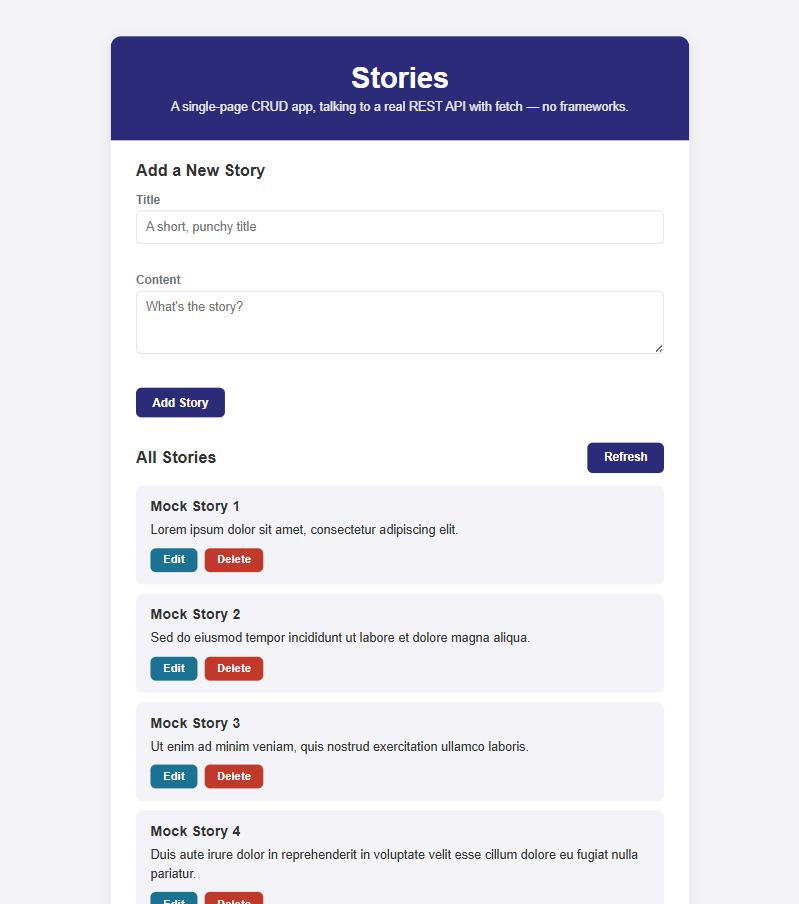
This project is deployed right here on the site, talking to the real API — open the live demo in a new tab. Add a story, edit it in place, then delete it — every single one of those is a real HTTP request to a real server, and refreshing the page proves it: whatever you changed is still there.
Here's the page after loading the API's ten built-in mock stories:
Try It Yourself
- Add a character counter next to the Content field — a small
<span>showing"123 / 500"that updates on every keystroke (reuse the"input"listener fromsetupLiveValidation) and turns red once the visitor goes overCONTENT_MAX. - Right now,
apiDeleteStoryhas no confirmation insidescript.jsitself —window.confirmis called insetupListDelegationinstead. Replace that native browser confirm with your own styled "Are you sure?" panel that appears in place of the card's buttons, with its own Yes/No buttons — this removes the only piece of native, unstyled browser UI left on the page. - Add a Cancel confirmation too: if the visitor has changed the title or content in edit mode
and clicks Cancel, show a native
confirm()("Discard your changes?") before reverting — right now Cancel always discards silently. - The API has no search endpoint, but
GET /storiesreturns everything — add a search<input>above the list that filters the already-loaded array client-side (by title, case-insensitive) and re-renders, without making a new network request for every keystroke.
Key Takeaways
- Keep "talk to the server" (
apiGetStories,apiCreateStory, ...) and "update the page" (renderStories,loadStories) as separate functions — every function that touchesfetchstays unaware of the DOM, and every function that touches the DOM stays unaware offetch. - When an API performs no server-side validation, your client-side validation isn't a UX nicety — it's the only thing standing between the form and garbage data. Write it as small, reusable, pure functions you can call from every form on the page.
- Re-fetching the whole list after every create, update, or delete is a simple, reliable way to keep the page in sync with the server — trading one extra request for never having the UI and the database quietly disagree.
- One delegated
clicklistener on the list's parent element handles Edit, Save, Cancel, and Delete for every card — including ones added long after the page first loaded — usingevent.target.closest(...)to find the right card andclassList.contains(...)to find the right button. - Always escape text that came from the network before putting it in
innerHTML— anything a previous visitor typed into this exact form could otherwise execute as real HTML for the next one.