EJS Views and express-ejs-layouts
Every tutorial so far that showed something in a browser did it with fetch — JavaScript
running after the page loaded, asking a server for JSON. This tutorial builds a page
the opposite way: the server builds the actual HTML, with the data already baked in,
before the browser ever sees it — no client-side JavaScript at all. That's what a
template engine does, and EJS is the one this tutorial uses, matched with
express-ejs-layouts so every page can share one header and footer instead of
repeating them.
Download the code
⬇ Download ejs-express-layouts.zip
— unzip it, run npm install, then node server.js. Part 6 walks through every
file inside it.
Prerequisites: Build a REST API with Express and Lecture 24: Response Generation with Templates — that lecture covers the template-engine concept and EJS syntax in depth; this tutorial is its hands-on companion, building one complete multi-action app rather than isolated examples.
In This Tutorial
- Set up EJS as Express's view engine, and render a page with real data in it
- EJS tags:
<%= %>to output a value,<% %>to run plain JavaScript (loops,if) - Pull a repeated header/footer into partials with
include() - Solve the repetition partials still leave behind with express-ejs-layouts
- Submit an HTML
<form>with no JavaScript, and the Post/Redirect/Get pattern - Build a complete, multi-page Tasks app — add, toggle, and delete, no
fetchanywhere
Part 1: EJS as the View Engine
const express = require("express");

const app = express();
app.set("view engine", "ejs"); // tells Express to use EJS
app.set("views", "./views");   // folder where your .ejs files live (default is "views")

app.get("/", (req, res) => {
  res.render("home", { visitorName: "Ayesha" });
});

app.listen(3000);
app.set("view engine", "ejs") tells Express that res.render(name, data) should look
for views/<name>.ejs, run it through EJS, and send the resulting HTML as the response.
data (the second argument) becomes variables available inside that template.
<%= expression %> runs the JavaScript expression inside it and inserts the escaped
result directly into the HTML — < and > in the value itself get turned into HTML
entities, which is what keeps user-supplied text from accidentally becoming real markup
(the same XSS concern escapeHtml() solved by hand in the Stories CRUD tutorial — EJS's
<%= does it automatically).
Part 2: Logic Inside a Template
Plain <% %> tags (no =) run JavaScript without inserting anything — for loops,
conditionals, anything that isn't itself a value to print:
Every <% has to be balanced by a matching %>, exactly like a brace in JavaScript
itself — the forEach's opening { is inside one <% %> tag, and its closing } is
inside a different one, further down, with plain HTML sitting in between them that
gets repeated once per task.
Part 3: Partials — Sharing a Header and Footer
Copy-pasting the same <header>/<footer> HTML onto every page is exactly the kind of
repetition templates are supposed to eliminate. EJS's include() pulls in another
template file at that exact spot:
<!-- views/home.ejs -->
<%- include("partials/header") %>
<main>
  <p>Hello, <%= visitorName %>!</p>
</main>
Note the tag is <%-, not <%= — a single - instead of =. <%- inserts its result
without escaping it, which matters here because include() returns a whole chunk of
real HTML (the header partial's markup); running that through the same escaping <%=
does would turn every < in it into literal text instead of a real tag.
Part 4: The Problem Partials Don't Solve
include() removes the repeated text, but every single page still has to remember to
write <%- include("partials/header") %> at the top and
<%- include("partials/footer") %> at the bottom, by hand, every time. Forget one on a
new page, and that page is missing its header — nothing warns you.
express-ejs-layouts flips this around: instead of every page including a shared
header, one shared layout includes every page.
const expressLayouts = require("express-ejs-layouts");

app.set("view engine", "ejs");
app.use(expressLayouts);
app.set("layout", "layout"); // uses views/layout.ejs as the shared shell
<!-- views/layout.ejs -->
<!DOCTYPE html>
<html>
<head><title><%= title %></title></head>
<body>
  <%- include("partials/header") %>
  <main>
    <%- body %>
  </main>
  <%- include("partials/footer") %>
</body>
</html>
<%- body %> is the one new piece: express-ejs-layouts injects whatever
res.render("home", {...}) rendered right there, inside the shared shell. Every
individual view file (views/home.ejs, and any other page you add later) now only needs
to contain its own unique content — no <html>, no header, no footer, none of it — the
layout wraps around all of them automatically, for every route, with no per-page
reminder required.
Part 5: Submitting a Form Without JavaScript
An HTML <form> can submit entirely on its own, with zero JavaScript:
<form action="/tasks" method="POST">
  <input type="text" name="title">
  <button type="submit">Add</button>
</form>
app.use(express.urlencoded({ extended: true })); // parses a <form> POST body into req.body

app.post("/tasks", (req, res) => {
  tasks.push({ id: nextId++, title: req.body.title, done: false });
  res.redirect("/"); // NOT res.render() -- see below
});
express.urlencoded() is express.json()'s counterpart for the format a plain HTML
form actually sends (title=Buy+milk, not JSON) — register it the same way, before any
route that reads req.body.
Redirect after a POST, don't render
The handler above ends with res.redirect("/"), not
res.render("home", {...}). This is the Post/Redirect/Get pattern: if the
response to a POST were the rendered page directly, refreshing that page would
re-submit the exact same form data (the browser just repeats its last request) —
adding the same task again, and again, every refresh. Redirecting sends the browser
to make a fresh GET / request instead, so refreshing that page just re-displays
the current state, harmlessly, as many times as you like.
Part 6: The Complete App
server.js
const express = require("express");
const expressLayouts = require("express-ejs-layouts");

const app = express();
app.set("view engine", "ejs");
app.set("views", "./views");
app.use(expressLayouts);
app.set("layout", "layout"); // views/layout.ejs is the shared shell for every page
app.use(express.static("public")); // serves /style.css and any other static file
app.use(express.urlencoded({ extended: true })); // parses an HTML <form> POST body into req.body

let tasks = [
  { id: 1, title: "Learn EJS", done: false },
  { id: 2, title: "Add a shared layout", done: false },
];
let nextId = 3;

app.get("/", (req, res) => {
  res.render("index", { title: "My Tasks", tasks });
});

app.post("/tasks", (req, res) => {
  const title = (req.body.title || "").trim();
  if (title) {
    tasks.push({ id: nextId++, title, done: false });
  }
  res.redirect("/"); // Post/Redirect/Get -- see Part 5
});

app.post("/tasks/:id/toggle", (req, res) => {
  const task = tasks.find((t) => t.id === Number(req.params.id));
  if (task) task.done = !task.done;
  res.redirect("/");
});

app.post("/tasks/:id/delete", (req, res) => {
  tasks = tasks.filter((t) => t.id !== Number(req.params.id));
  res.redirect("/");
});

const PORT = 3002;
app.listen(PORT, () => {
  console.log(`EJS Tasks app listening on http://localhost:${PORT}`);
});
views/layout.ejs
<!DOCTYPE html>
<html lang="en">
<head>
  <meta charset="UTF-8">
  <meta name="viewport" content="width=device-width, initial-scale=1.0">
  <title><%= typeof title !== "undefined" ? title : "My Tasks" %></title>
  <link rel="stylesheet" href="/style.css">
</head>
<body>
  <div class="container">
    <%- include("partials/header") %>
    <main>
      <%- body %>
    </main>
    <%- include("partials/footer") %>
  </div>
</body>
</html>
views/index.ejs — the page-specific content only; the layout above wraps around it
<section class="panel">
  <h2>Add a Task</h2>
  <form action="/tasks" method="POST" class="task-form">
    <input type="text" name="title" placeholder="What do you need to do?" required>
    <button type="submit">Add</button>
  </form>
</section>

<section class="panel">
  <h2>All Tasks (<%= tasks.length %>)</h2>
  <% if (tasks.length === 0) { %>
    <p class="empty-state">No tasks yet -- add one above.</p>
  <% } else { %>
    <ul class="task-list">
      <% tasks.forEach(function (task) { %>
        <li class="task-item <%= task.done ? 'done' : '' %>">
          <span class="task-title"><%= task.title %></span>
          <div class="task-actions">
            <form action="/tasks/<%= task.id %>/toggle" method="POST">
              <button type="submit" class="toggle-btn"><%= task.done ? "Undo" : "Done" %></button>
            </form>
            <form action="/tasks/<%= task.id %>/delete" method="POST">
              <button type="submit" class="delete-btn">Delete</button>
            </form>
          </div>
        </li>
      <% }); %>
    </ul>
  <% } %>
</section>
views/partials/header.ejs and footer.ejs are the small, one-line partials from
Part 3 — the full files, plus the stylesheet, are all in the zip at the top of this
page.
Running It
Open http://localhost:3002 in a browser — type a task into the input and press
Add, then click Done on one. Here's the page after doing exactly that:
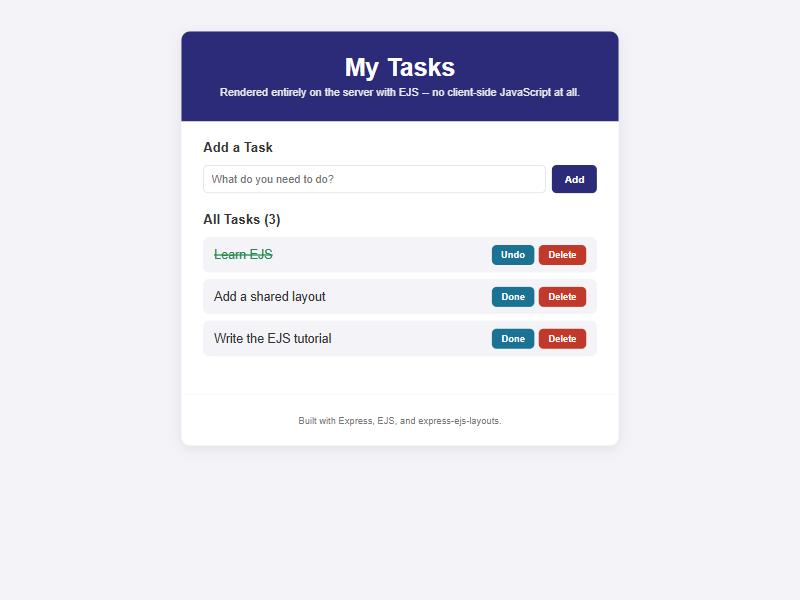
Notice the URL bar never changes to anything with # or stays on a single-page app —
every click is a real form submission, a real redirect, and a real new page load. Slower
than the Fetch-based Stories CRUD tutorial, but it works with JavaScript turned off
entirely, which is worth having felt at least once.
Try It Yourself
- Add an
editaction: a form (pre-filled with the task's current title) thatPUTs — well, HTML forms can't sendPUT, soPOSTs — to/tasks/:id/edit, updates the title, and redirects back to/. - Add a second real page —
/about, say — with its ownviews/about.ejsand its own route. Confirm it automatically gets the same header and footer with zero extra code, purely becauseapp.set("layout", "layout")applies to everyres.render()call in the app. - Temporarily change the
titletask to inject HTML, e.g. add a task titled<b>bold</b>, submit it, and confirm EJS's<%=escaping shows the literal text<b>bold</b>on the page instead of actually bolding anything — then explain in a comment why that's the correct, safe behavior.
Key Takeaways
- A template engine like EJS lets the server build real HTML with real data in it, before the browser ever receives anything — no client-side JavaScript required.
<%= %>outputs an escaped value (safe for user-supplied text);<%- %>outputs unescaped HTML (for your own trusted partials and the layout'sbody); plain<% %>runs logic with no output at all.include("partial-name")shares a repeated chunk of markup, but every page still has to remember to include it — express-ejs-layouts inverts that: one sharedlayout.ejswraps every page automatically via<%- body %>.- An HTML
<form>needs no JavaScript to submit;express.urlencoded()parses its body intoreq.body, the same wayexpress.json()parses a fetch-sent JSON body. - Post/Redirect/Get: a route handling a
POSTshouldres.redirect()to aGETroute afterward, notres.render()the result directly — otherwise refreshing the page re-submits the same form data again.