Build a Server with Node's http Module
Every tutorial in this course so far has run entirely in a browser. This one is the
first to run somewhere else: a terminal, as a process that stays alive and listens for
requests. Before reaching for Express (the very next tutorial), it's worth building one
tiny API with nothing but Node's built-in http module — no framework, no
dependencies at all — so you can actually see what a framework like Express is doing for
you, instead of taking it on faith.
Download the code
Every file this tutorial builds is available as a ready-to-run project:
⬇ Download node-http-server.zip.
Unzip it, run npm install inside the folder (there's nothing to install yet, but
it's the habit to build), then node server.js — Part 5 walks through exactly what
it does.
Prerequisites: npm and Package Management and Core JavaScript (ES6+). No prior backend experience assumed — this tutorial is where that starts.
In This Tutorial
- Create the simplest possible Node server:
http.createServer()and.listen() - Understand the
requestandresponseobjects every request handler receives - Send JSON back with the right status code and headers, by hand
- Route by
req.methodandreq.urlyourself — there's no router to do it for you - Read and parse a POST request's body one chunk at a time
- Build a small, complete Tasks API, then run it and see it respond for real
Part 1: The Simplest Possible Server
const http = require("http");

const server = http.createServer((req, res) => {
  res.end("Hello from Node!");
});

server.listen(3000, () => {
  console.log("Listening on http://localhost:3000");
});
http.createServer() takes one function — called a request handler — and runs it
every single time a request arrives, for any URL, with any method. req describes
what came in (method, URL, headers, body); res is how you reply. res.end(text) sends
text as the complete response body and closes the connection. .listen(3000) starts
the server listening on port 3000 and doesn't return — the process just stays alive,
waiting.
Save this as server.js and run it:
The terminal doesn't give you your prompt back — that's expected, the server is still
running. Visit http://localhost:3000 in a browser (any path works right now — nothing
checks the URL yet) and you'll see Hello from Node!. Stop it with Ctrl+C when you're
done looking.
Part 2: Sending JSON, with the Right Headers
A real API sends JSON, not plain text, and needs to say so:
const http = require("http");

const server = http.createServer((req, res) => {
  const body = JSON.stringify({ message: "Hello from Node!" });
  res.writeHead(200, { "Content-Type": "application/json" });
  res.end(body);
});

server.listen(3000, () => {
  console.log("Listening on http://localhost:3000");
});
res.writeHead(statusCode, headers) sets the HTTP status code and any response headers
before you call res.end() — once the body starts going out, headers can't change
anymore. Content-Type: application/json tells whatever's reading the response "parse
this as JSON," the same header Lecture 15's Fetch API examples checked for on the way
in.
Part 3: Routing by Hand
req.method and req.url are the only two things http gives you to decide what a
request is asking for — there's no app.get("/tasks", ...) here, you write the if
statements yourself:
const http = require("http");

function sendJson(res, statusCode, data) {
  const body = JSON.stringify(data);
  res.writeHead(statusCode, {
    "Content-Type": "application/json",
    "Content-Length": Buffer.byteLength(body),
  });
  res.end(body);
}

const server = http.createServer((req, res) => {
  if (req.method === "GET" && req.url === "/tasks") {
    return sendJson(res, 200, [{ id: 1, title: "Learn the http module" }]);
  }

  sendJson(res, 404, { error: `No route for ${req.method} ${req.url}` });
});

server.listen(3000, () => {
  console.log("Listening on http://localhost:3000");
});
sendJson is a small helper that bundles the three things every JSON response needs
(stringify the body, set the content type, set an accurate Content-Length) so the
actual routing logic below it stays readable. The very last line — sendJson(res, 404,
...) — matters as much as the routes above it: without a catch-all, a request to a URL
nothing handles would hang forever, since nothing would ever call res.end().
A route with an :id in it needs a regular expression
req.url is a flat string — /tasks/7 is just the seven characters after
/tasks/, with nothing pulling 7 out for you automatically the way Express's
req.params.id will in the next tutorial. Part 5 shows the regex that does it by
hand: url.match(/^\/tasks\/(\d+)$/).
Part 4: Reading a POST Body
req is a stream — its data doesn't all arrive at once, it arrives in pieces
(chunks) over time, and you assemble it yourself:
function readJsonBody(req) {
  return new Promise((resolve, reject) => {
    const chunks = [];
    req.on("data", (chunk) => chunks.push(chunk));
    req.on("end", () => {
      try {
        resolve(JSON.parse(Buffer.concat(chunks).toString()));
      } catch (error) {
        reject(error);
      }
    });
    req.on("error", reject);
  });
}
req.on("data", ...) fires once per chunk as it arrives; req.on("end", ...) fires
once, after the very last chunk, when the whole body has arrived. Buffer.concat(chunks)
joins every chunk into one buffer, .toString() turns that into text, and JSON.parse
turns the text into a real object — the exact same end result express.json() gives you
for free, which is the whole point of showing it done by hand once.
Part 5: The Complete Tasks API
Everything above, combined into one small, real API — GET /tasks, GET /tasks/:id,
and POST /tasks, with an in-memory array standing in for a database:
const http = require("http");

// In-memory data -- resets every time the server restarts. No database yet;
// that comes in a later lecture/tutorial. Each task is { id, title, done }.
let tasks = [
  { id: 1, title: "Learn the http module", done: false },
  { id: 2, title: "Build a tiny API with no framework", done: false },
];
let nextId = 3;

function sendJson(res, statusCode, data) {
  const body = JSON.stringify(data);
  res.writeHead(statusCode, {
    "Content-Type": "application/json",
    "Content-Length": Buffer.byteLength(body),
  });
  res.end(body);
}

function readJsonBody(req) {
  return new Promise((resolve, reject) => {
    const chunks = [];
    req.on("data", (chunk) => chunks.push(chunk));
    req.on("end", () => {
      if (chunks.length === 0) return resolve({});
      try {
        resolve(JSON.parse(Buffer.concat(chunks).toString()));
      } catch (error) {
        reject(error);
      }
    });
    req.on("error", reject);
  });
}

const server = http.createServer(async (req, res) => {
  const { method, url } = req;

  if (method === "GET" && url === "/tasks") {
    return sendJson(res, 200, tasks);
  }

  const singleTaskMatch = url.match(/^\/tasks\/(\d+)$/);
  if (method === "GET" && singleTaskMatch) {
    const id = Number(singleTaskMatch[1]);
    const task = tasks.find((t) => t.id === id);
    if (!task) return sendJson(res, 404, { error: "Task not found" });
    return sendJson(res, 200, task);
  }

  if (method === "POST" && url === "/tasks") {
    let body;
    try {
      body = await readJsonBody(req);
    } catch (error) {
      return sendJson(res, 400, { error: "Invalid JSON body" });
    }
    if (!body.title || typeof body.title !== "string") {
      return sendJson(res, 400, { error: "'title' is required" });
    }
    const newTask = { id: nextId++, title: body.title, done: false };
    tasks.push(newTask);
    return sendJson(res, 201, newTask);
  }

  sendJson(res, 404, { error: `No route for ${method} ${url}` });
});

const PORT = 3000;
server.listen(PORT, () => {
  console.log(`Tasks API (raw http module) listening on http://localhost:${PORT}`);
});
Running It and Trying Every Route
In a second terminal, curl every route in turn (a browser address bar can only do
GET, so POST needs a tool like curl, Postman, or the Fetch API from Lecture 15):
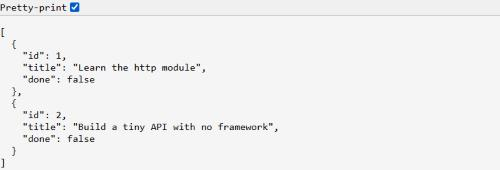
[{"id":1,"title":"Learn the http module","done":false},{"id":2,"title":"Build a tiny API with no framework","done":false}]
curl -X POST http://localhost:3000/tasks \
  -H "Content-Type: application/json" \
  -d '{"title":"Write the tutorial"}'
Here's GET /tasks opened directly in a browser:
Testing with Postman
A browser address bar can only send GET requests, and typing a curl command gets
tedious fast once you're testing several routes back and forth. Postman is a GUI
app built exactly for this: pick a method, type a URL, fill in a body if you need one,
and click Send — no terminal required.
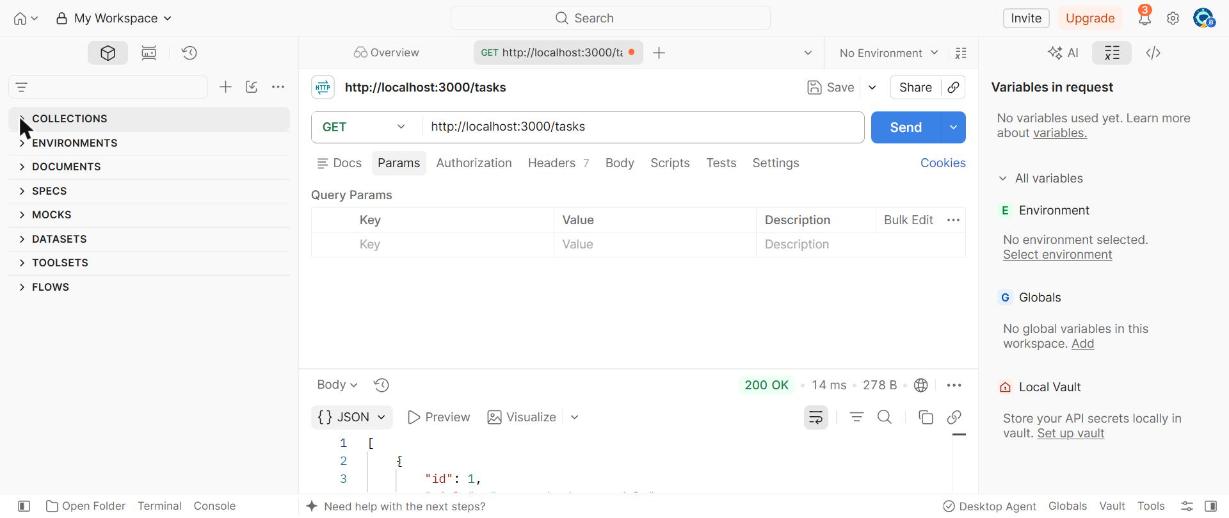
GET /tasks — set the method dropdown to GET, type
http://localhost:3000/tasks into the URL bar, and click Send. The response panel
at the bottom shows the status (200 OK) and the JSON body, nicely color-highlighted:
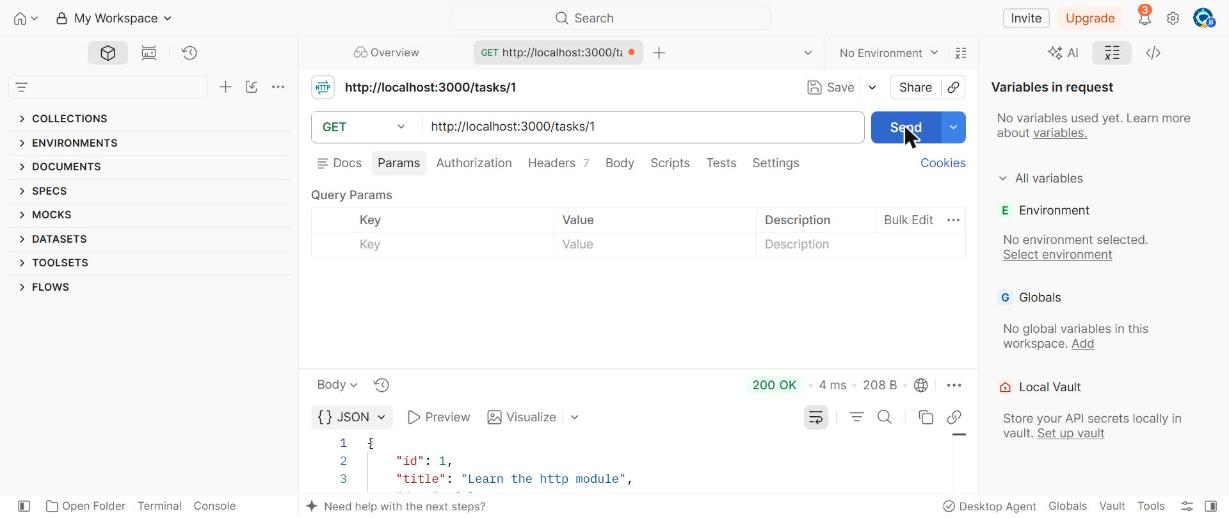
GET /tasks/1 — route parameters work the same way as any other URL; just type the
id straight into the path:
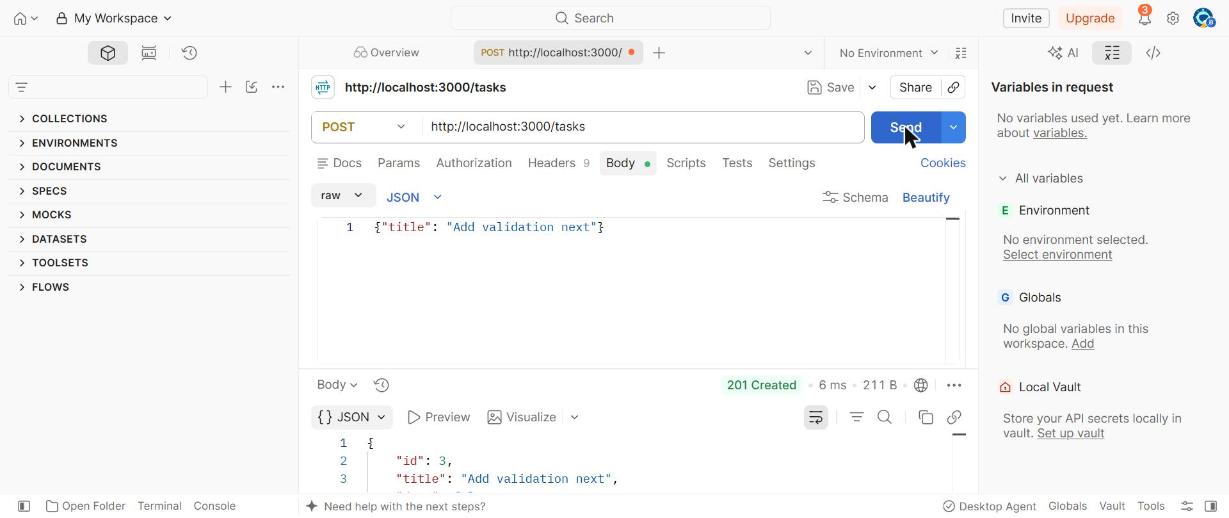
POST /tasks — this is where Postman earns its keep over a browser. Switch the
method dropdown to POST, then open the Body tab below the URL bar, select raw,
and choose JSON from the format dropdown on the right. Type the request body as
JSON (Postman sets the Content-Type: application/json header for you automatically
when you pick "JSON"):
Click Send, and the new task comes back with 201 Created and the id the server
assigned it:
Try It Yourself
- Add a
DELETE /tasks/:idroute yourself, reusing the samesingleTaskMatchregex pattern fromGET /tasks/:id. Remove the matching task from thetasksarray with.filter()or.splice(), and respond with the deleted task. - The current
POST /taskshandler never checks that the request'sContent-Typeis actuallyapplication/jsonbefore trying to parse it. Add that check, and respond with415 Unsupported Media Type(a real HTTP status code) if it's missing. - Time how long it takes you to add one new route by hand versus how long the same route takes in the next tutorial's Express version — write down the difference before you forget it.
Key Takeaways
http.createServer(handler)runshandler(req, res)for every request, no matter the method or URL — routing, JSON parsing, and body reading are all things you write, not things the module gives you.res.writeHead(status, headers)must be called beforeres.end(body)— headers can't change once the response body starts.req.urlandreq.methodare the only built-in way to tell requests apart; a route parameter like:idneeds a hand-written regular expression to extract.reqis a stream — its body arrives indataevents, one chunk at a time, and isn't complete until theendevent fires.- Every one of these manual steps (routing, JSON responses, body parsing) is exactly what a framework like Express automates — which is easiest to appreciate once you've written it by hand at least once.