Build a REST API with Express
The previous tutorial built a small Tasks API with nothing but Node's http module, and
along the way hit three real annoyances: routing by hand with if statements, parsing a
JSON body one chunk at a time, and writing writeHead/end for every single response.
Express is a framework that exists specifically to make all three of those
disappear. This tutorial rebuilds the exact same API in Express — same routes, same
behavior — so you can see directly, line by line, what a framework actually buys you.
Download the code
⬇ Download express-server.zip
— unzip it, run npm install inside the folder to pull down Express, then
node server.js. Part 6 walks through exactly what it does.
Prerequisites: Build a Server with Node's http Module — this tutorial directly compares against it — and npm and Package Management.
In This Tutorial
- Install Express and start the smallest possible app
- Define routes with
app.get,app.post,app.put, andapp.delete— one line each - Read route parameters with
req.params, no regex required - Parse a JSON request body automatically with
express.json() - Add a catch-all 404 handler
- Rebuild the full Tasks API — now with
PUTandDELETEtoo — and run it for real
Part 1: Install Express and Say Hello
const express = require("express");

const app = express();

app.get("/", (req, res) => {
  res.send("Hello from Express!");
});

app.listen(3000, () => {
  console.log("Listening on http://localhost:3000");
});
express() creates an app — an object representing your whole server.
app.get(path, handler) registers a handler that runs only for GET requests to that
exact path; compare that to the raw http version's if (req.method === "GET" &&
req.url === "/") { ... }, now gone entirely. res.send(text) is Express's version of
res.end(text) — it also sets a sensible Content-Type automatically based on what you
pass it.
Part 2: JSON Responses, Automatically
res.json(data) does everything the raw-http version's sendJson helper did by
hand — JSON.stringify, the Content-Type: application/json header, the correct
Content-Length — in one call, with the status defaulting to 200. Need a different
status code? Chain .status() first: res.status(201).json(newTask).
Part 3: Route Parameters
app.get("/tasks/:id", (req, res) => {
  const id = Number(req.params.id);
  res.json({ requestedId: id });
});
The :id in the path is a route parameter — Express matches it against whatever's
actually in the URL and hands it to you, already extracted, as req.params.id (always
a string, which is why it's wrapped in Number(...) to compare against the numeric
ids in the tasks array). This is the exact thing the raw http version needed a
hand-written regular expression for.
Part 4: Reading the Request Body
app.use(express.json());

app.post("/tasks", (req, res) => {
  console.log(req.body); // already a real object -- no manual parsing
  res.status(201).json({ received: req.body });
});
app.use(express.json()) registers middleware — code that runs on every request
before your route handlers do. This particular middleware reads the request body,
parses it as JSON, and attaches the result to req.body — replacing the raw version's
entire readJsonBody function (the data/end event listeners, the Buffer.concat,
all of it) with one line, run once, for the whole app.
Middleware order matters
app.use(express.json()) has to run before any route handler that reads
req.body — Express runs middleware and routes in the order you register them, top
to bottom. Put it near the top of the file, before your routes.
Part 5: A Catch-All 404
app.use((req, res) => {
  res.status(404).json({ error: `No route for ${req.method} ${req.originalUrl}` });
});
Registered with app.use() and no path, this runs for any request that didn't match a
route above it — Express's equivalent of the raw version's final sendJson(res, 404,
...) fallback. It has to be the last thing registered, for the same reason
middleware order matters above: Express tries routes top to bottom and stops at the
first match.
Part 6: The Complete Tasks API — Now with Full CRUD
const express = require("express");

const app = express();
app.use(express.json()); // parses a JSON request body into req.body -- no manual chunk-reading needed

let tasks = [
  { id: 1, title: "Learn Express", done: false },
  { id: 2, title: "Rewrite the http-module API", done: false },
];
let nextId = 3;

app.get("/tasks", (req, res) => {
  res.json(tasks);
});

app.get("/tasks/:id", (req, res) => {
  const task = tasks.find((t) => t.id === Number(req.params.id));
  if (!task) return res.status(404).json({ error: "Task not found" });
  res.json(task);
});

app.post("/tasks", (req, res) => {
  const { title } = req.body;
  if (!title || typeof title !== "string") {
    return res.status(400).json({ error: "'title' is required" });
  }
  const newTask = { id: nextId++, title, done: false };
  tasks.push(newTask);
  res.status(201).json(newTask);
});

app.put("/tasks/:id", (req, res) => {
  const task = tasks.find((t) => t.id === Number(req.params.id));
  if (!task) return res.status(404).json({ error: "Task not found" });
  if (typeof req.body.title === "string") task.title = req.body.title;
  if (typeof req.body.done === "boolean") task.done = req.body.done;
  res.json(task);
});

app.delete("/tasks/:id", (req, res) => {
  const index = tasks.findIndex((t) => t.id === Number(req.params.id));
  if (index === -1) return res.status(404).json({ error: "Task not found" });
  const [deleted] = tasks.splice(index, 1);
  res.json(deleted);
});

// Runs for any URL/method that didn't match a route above.
app.use((req, res) => {
  res.status(404).json({ error: `No route for ${req.method} ${req.originalUrl}` });
});

const PORT = 3001;
app.listen(PORT, () => {
  console.log(`Tasks API (Express) listening on http://localhost:${PORT}`);
});
Line for line, this is noticeably shorter than the raw http version — and it gained
PUT and DELETE, which would have needed two more hand-written if blocks and two
more regex matches to add there.
Running It and Trying Every Route
curl -X PUT http://localhost:3001/tasks/1 \
  -H "Content-Type: application/json" \
  -d '{"done":true}'
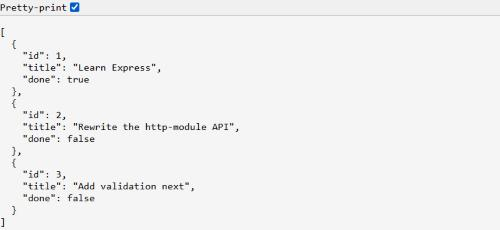
[{"id":1,"title":"Learn Express","done":true},{"id":3,"title":"Write the Express tutorial","done":false}]
Here's that final GET /tasks after a PUT, a POST, and a DELETE, open in a
browser:
Testing with Postman
curl is fast once you know the flags, but Postman makes the same CRUD workflow
easier to see and repeat while you're still learning it: every field — method, URL,
headers, body — is its own labeled box on screen, and the response is highlighted and
collapsible instead of one unbroken line of terminal text.
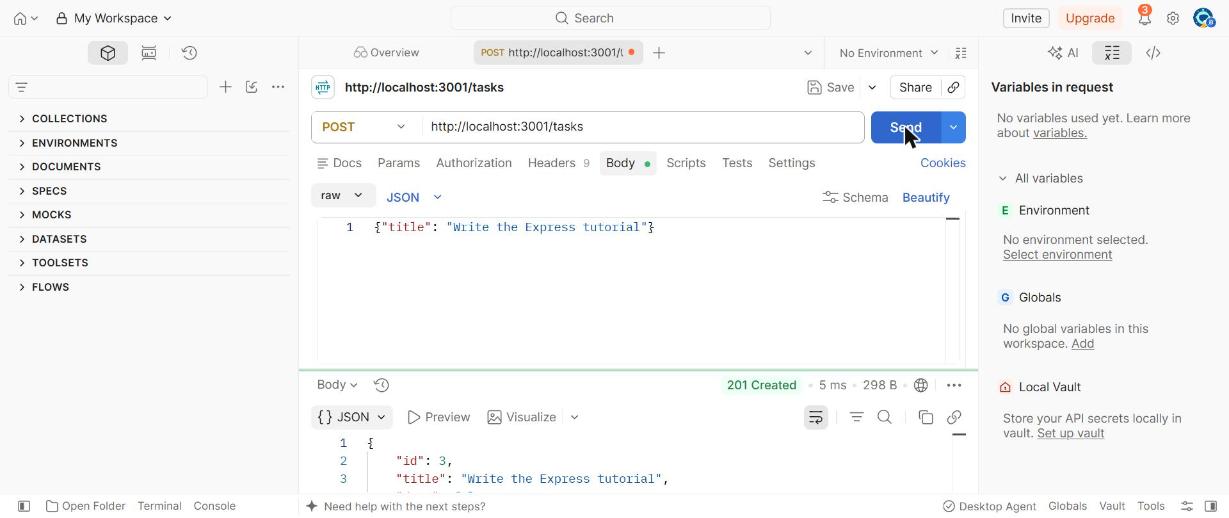
POST /tasks — set the method to POST and the URL to
http://localhost:3001/tasks. Open the Body tab, select raw, pick JSON from
the format dropdown, and type:
Click Send: Express's express.json() middleware parses this exactly the same way
it would parse a body from curl -d, and the new task comes back with 201 Created:
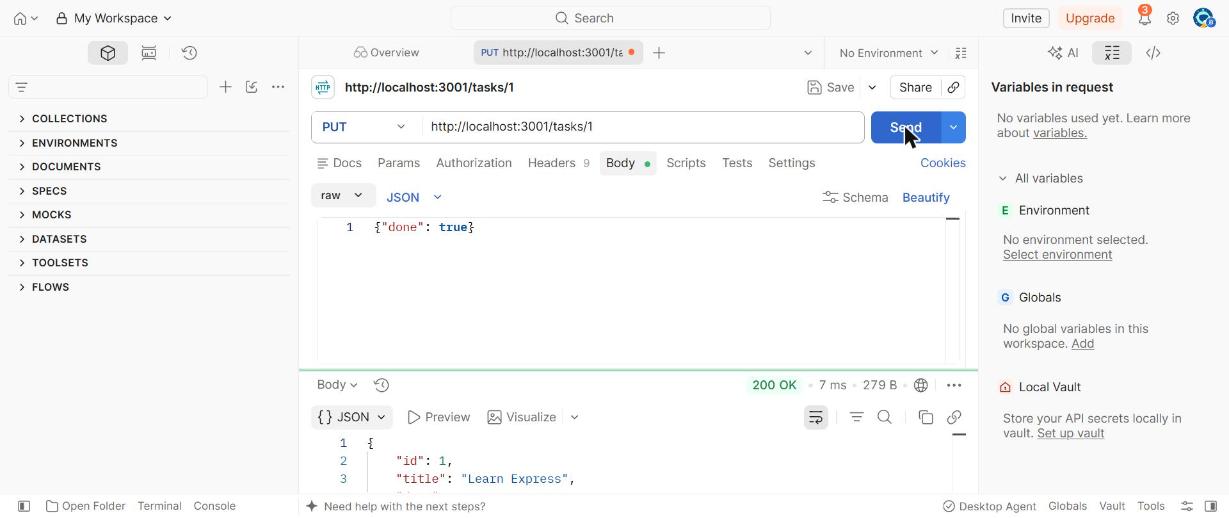
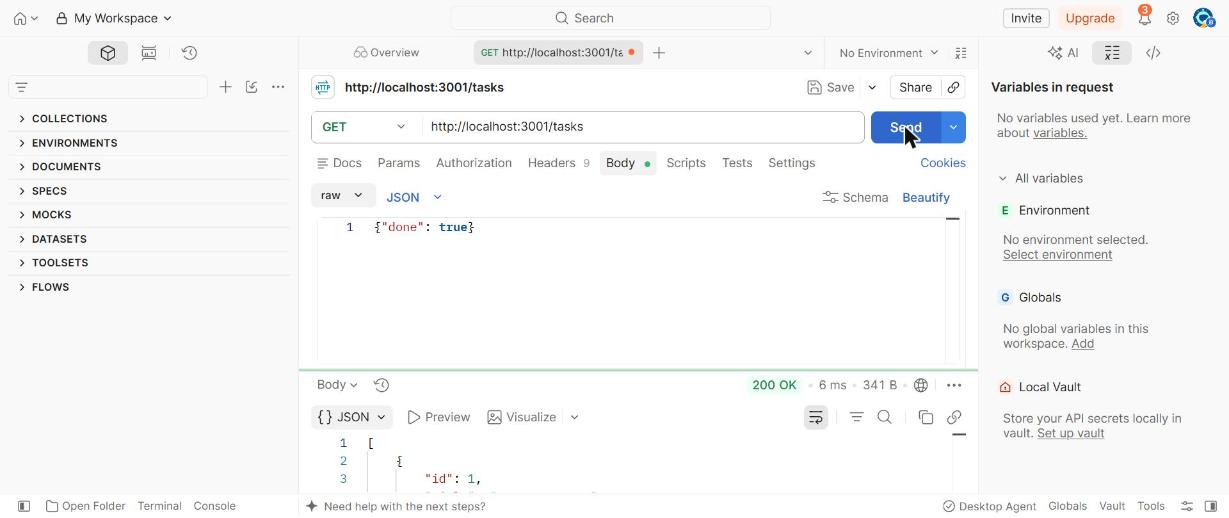
PUT /tasks/1 — switch the method to PUT, point the URL at /tasks/1, and set the
body to {"done": true}. The response shows task 1 with done flipped to true:
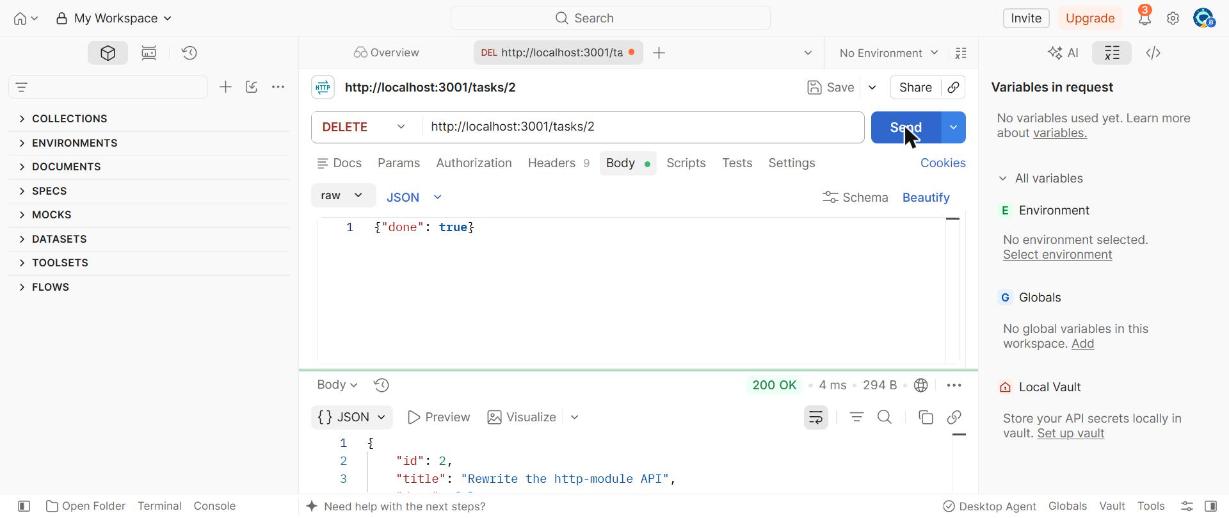
DELETE /tasks/2 — switch the method to DELETE and point the URL at /tasks/2.
No body needed; the response echoes back the task that just got removed:
GET /tasks (final check) — switch back to GET with no body, and the list now
reflects every change made above: task 1 updated, task 2 gone, task 3 added.
Save these as a collection
Postman lets you save each request into a Collection so you don't have to retype the method, URL, and body every time you want to re-test this API — click Save next to the Send button once, and every request you build after that can be reopened from the sidebar instead of rebuilt from scratch.
Try It Yourself
- Add input validation to
PUT /tasks/:idthe same wayPOST /tasksvalidatestitle— right now,PUTsilently accepts atitleof any type as long as it passes thetypeof === "string"check, but never rejects a request that sends neithertitlenordone. - Add a second catch-all, this time for errors: wrap each route's body in
try/catchand callnext(error), then add a 4-argument error-handling middleware ((err, req, res, next) => {...}) at the very end that responds with500— Express recognizes a 4-argument middleware function specifically as an error handler. - Count the total lines in this file versus the raw
httpversion from the previous tutorial, for the same four routes (GETlist,GETone,POST, plus the 404 fallback) — then imagine adding six more routes to each, and consider how that gap would grow.
Key Takeaways
app.get/post/put/delete(path, handler)replace hand-writtenif (req.method === ... && req.url === ...)checks entirely — Express matches the method and path for you.req.params.idgives you a route parameter already extracted — no regular expression needed, unlike the rawhttpversion.app.use(express.json())is middleware: code that runs on every request before your routes do. Order matters — register it before any route that readsreq.body.res.json(data)andres.status(code).json(data)replace an entire hand-writtensendJsonhelper, with the same guarantees (correctContent-Type, correct body).- A final
app.use((req, res) => {...})with no path is Express's catch-all 404 — register it last, since Express checks routes in registration order and stops at the first match.